How to Block Facebook Adverts in Internet Explorer 10

Internet-Explorer-10-Accessability

If you are a massive Facebook user, the ads displaying on the page are a real annoyance. Of course, there are several ad blockers available for Firefox and Chrome to deal with those ads (for example, Adblock Plus), but how do you block ads in Internet Explorer, especially when using Windows RT (Surface Tablet)?

Internet Explorer 10 for Windows 7 Download Available (Release Preview)

Metro-IE10

Microsoft just released a pre-release version of Internet Explorer 10 for Windows 7 with new features and security enhancements. You can install it on your Windows 7 with Service Pack 1 (SP1) PC and enjoy a fast and fluid Web with the updated IE10 engine. Unlike the previous platform preview of IE10 for Windows 7, [...]

Enable Flash on all Sites in Metro Internet Explorer 10 on Windows 8 and Windows RT

Metro-IE10

You might have already learned that the Metro version of Internet Explorer 10 on Windows 8 as well as on Windows RT won’t play flash content properly on all websites. This is because Metro IE10 supports flash only on sites that Microsoft has whitelisted, other sites won’t play flash contents. Since lot of sites aren’t [...]

Replace Bing Search with Google Search in Internet Explorer 10 Under Windows 8

IE10-Manage-add-on

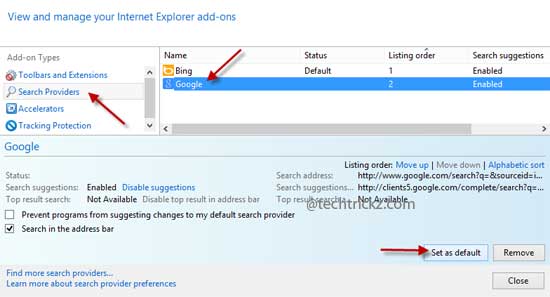
Bing is the default search engine for Internet Explorer 10 in Windows 8. Like Chrome or Firefox, Internet Explorer 10 does not have a straight option to change the default search engine Bing. If you would like to search using Google (or any other search engine) instead of Bing on IE10, here is how to [...]

Change Default Download Location of Internet Explorer 10 in Windows 8

Internet-Explorer-10

Windows 8 comes with an all-new browser Internet Explorer 10 (IE 10). Designed for both desktop and touchscreens, IE10 offers many new features as well as comes with a UI update. Here the topic is how to change the default download folder of Internet Explorer 10 in Windows 8. It’s very simple. Just read below [...]

Using Internet Explorer 10 Modern Experience (User Guide)

IE-10-Modern-Experiance

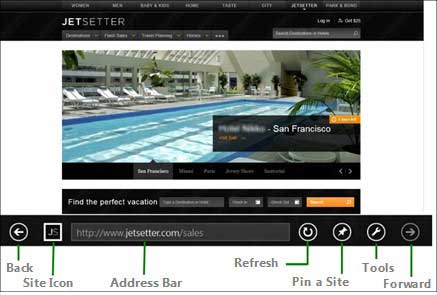
If you have the Windows 8 installed on your PC, you have noticed that the built-in browser Internet Explorer 10 (IE10) has two modes of operation – one is touch-optimized mode, which offers modern-style browsing experience (default), and another is the traditional desktop mode, which gives a web-browsing experience similar to Internet Explorer 9. If [...]