Skip to content
Outlook-Logo

Outlook App for Android Released, How to Configure it

Microsoft’s new Outlook.com mail service, which is designed to replace Hotmail, brings a bit more for its users. It gathers all your emails, social updates, contacts, calendars and SkyDrive files in one place. Previously, I had published articles on how to access Outlook web mail on Android device via a mail client and as push notification, now Microsoft has released an official Outlook app for Android, which offers new features including the ability use multiple Outlook.com account. Here is how to configure it.

Read more
Windows-8-Mail-app-settings

Add Gmail and Outlook Mail to Windows 8’s Mail app (How to)

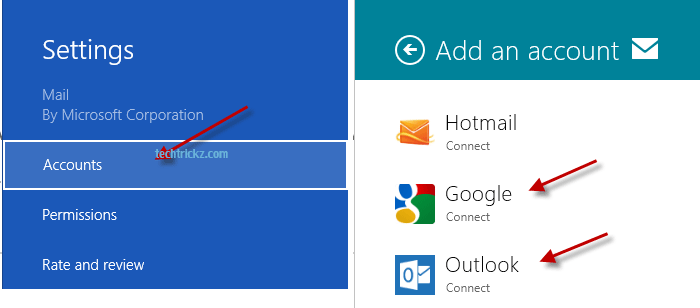
Though the Mail app comes with Windows 8 is simple in nature and feature wise far-off from Outlook or Windows Live Mail, it lets you access your Hotmail, Gmail and Microsoft’s new Outlook mail inbox right from your Windows 8 Start screen. You can read, reply or compose mail by just clicking the Mail app. If you don’t know how to add Gmail or Microsoft’s new Outlook mail to Windows 8’s Mail app, here is how it is.

Read more

How to Create Disposable Email on Hotmail For Total Privacy

Does your email inbox contain more spam emails than genuine mails? Do we really need a spam blocker program to block such emails? If you can create a disposable email address, you can control receiving spam mails a bit. You can use this self-destructing email address to register for web services in complete privacy.

Read more

Desktop Notification For Hotmail

Hotmail users can now get desktop notification on their unread email messages. If you are a Windows 7 user with Internet Explorer 9 installed, you will get alert on your unread messages and can access your Hotmail account from the desktop just with a click without first having to open the browser.Hotmail-notification

Read more
Back To Top