

Does your email inbox contain more spam emails than genuine mails? Do we really need a spam blocker program to block such emails? If you can create a disposable email address, you can control receiving spam mails a bit. You can use this self-destructing email address to register for web services in complete privacy. 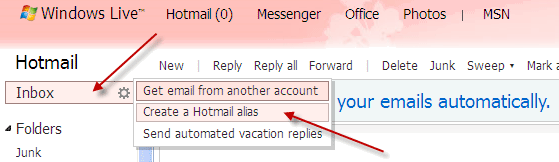
Here is how to create disposable emails on Hotmail:
If you have hotmail address, you can add alternative email addresses (alias) to your account by clicking the Inbox button and choosing ‘Create a Hotmail alias’ which can be deleted anytime.
Enter an email address of your choice, and choose a suffix (hotmail.com, live.com, etc). Then, when asking, create a new folder to receive email sent to that address. You can have multiple aliases on Hotmail.
You can delete this address at any time. For that click, Options – More options – Account details – email addresses. To delete an alias click Remove next to the relevant one.


Comments (1)
I am so thankful for this information.
I have been search searching and reading and trying for a long time. Anything suitable did not perform.
This is suitable because I have Windows Live Hotmail.
Comments are closed.