If you’re tired of sitting through ads just to watch a quick YouTube video, there’s a surprisingly simple solution that’s built right into the DuckDuckGo browser. Duck Player lets you watch YouTube without interruptions, and it’s free. Here is how to watch YouTube videos without ads on your computer or TV
I stumbled across this feature a few months ago and haven’t looked back. Here’s how to get it working on your device.
Download and Setting Up Duck Player
First, download the DuckDuckGo browser if you haven’t already. Once it’s installed, the setup is straightforward:
1. Open the menu — Click the three horizontal lines in the top-right corner
2. Go to Settings — Select the Settings option from the dropdown
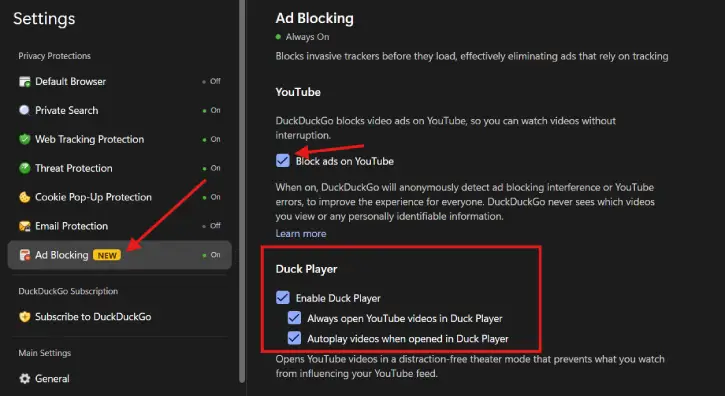
3. Find Ad Blocking — Look for the Ad Blocking section
4. Enable YouTube ad blocking — Tick the box labeled “Block ads on YouTube”
5. Turn on Duck Player — Check the “Enable Duck Player” option
Optional Settings to Consider
While you’re in Settings, you might want to enable these two extras:
- Always open YouTube videos in Duck Player — This automatically routes all YouTube links through Duck Player
Auto-play videos when opened in Duck Player — Videos will start playing as soon as Duck Player opens them
Once it’s working, you’ll see a small Duck Player logo appear at the bottom left corner of the video player. That’s your confirmation that ad blocking is active.
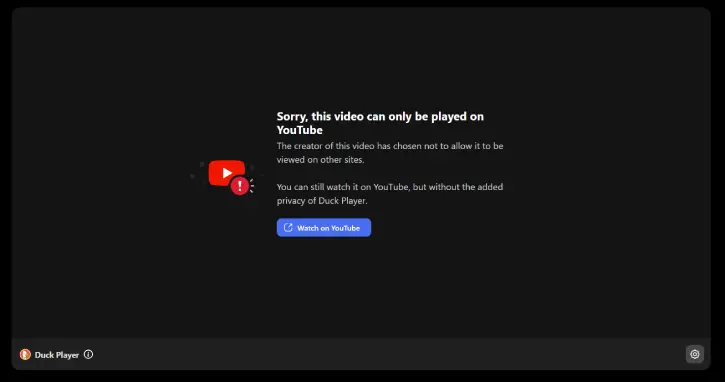
Note: Some YouTube videos will not work in Duck Player. You will get a warning saying “Sorry, this video can only be played on YouTube.” However, most of the videos will play in the player without any issue.
How Duck Player Actually Works
Here’s the thing that impressed me most: Duck Player doesn’t just block ads—it does so while protecting your privacy. When ad blocking is enabled, DuckDuckGo’s browser monitors whether the feature is working properly by checking for a few specific situations:
- YouTube showing messages that ad blockers aren’t allowed
Player errors like “this video is unavailable”
Long buffering pauses before playback starts
Ads or static content appearing despite ad blocking being on
If any of these happen, the browser sends a single anonymous signal to DuckDuckGo—at most once per day per category. That’s it. No constant tracking, no detailed logs.
What Duck Player Doesn’t Collect
This is where it gets reassuring. When Duck Player detects issues, those anonymous reports never include:
- The video URL, title, or channel name
Your YouTube account name
Your search or browsing history
Any unique identifier that could be traced back to you
The requests are fully encrypted, and DuckDuckGo doesn’t store IP addresses. You’re getting ad-free YouTube without surveillance.
FAQ
Q: Does Duck Player work on all devices?
A: Duck Player is available on the DuckDuckGo browser, which you can download on most major devices. Check DuckDuckGo’s website to see if it’s available for your specific platform.
Q: Will YouTube know I’m using an ad blocker?
A: Duck Player works by changing how you access YouTube. YouTube may detect that you’re using an ad blocker, but Duck Player is designed to handle this gracefully. If playback issues occur, they’re reported anonymously to DuckDuckGo for improvement.
Q: Can I still watch YouTube while signed into my account?
A: Yes. Duck Player works whether you’re signed in or not. If you are signed in, DuckDuckGo’s analytics can tell whether it’s a standard or Premium account (for the purpose of understanding how ad blocking affects different user types), but this information remains completely anonymous.
Q: What if Duck Player stops working?
A: DuckDuckGo continuously monitors ad blocking performance and updates the feature when YouTube changes how it serves ads. If you experience issues, make sure your DuckDuckGo browser is fully updated, and try refreshing the page.
Q: Is there any performance hit to using Duck Player?
A: Not really. Since it’s integrated into the browser itself, it runs efficiently without slowing down your device.
Conclusion
It’s hard to believe that blocking YouTube ads this effectively can also protect your privacy at the same time. The fact that Duck Player is built directly into the DuckDuckGo browser means there’s no extension to install, no separate tool to manage, and no added complexity. You get a cleaner YouTube experience without the typical trade-offs. If you haven’t tried it yet, give it a shot—it takes less than two minutes to set up, and you might wonder how you ever watched YouTube with ads after you’ve experienced the difference.