Remember when Google Earth was just for stalking your old house online? Things have changed dramatically. Google quietly launched something genuinely cool — a fully functional flight simulator built straight into the web version of Google Earth. No app to install, no Pro subscription, no payment required. Just fire up your browser and you’re ready to take off.
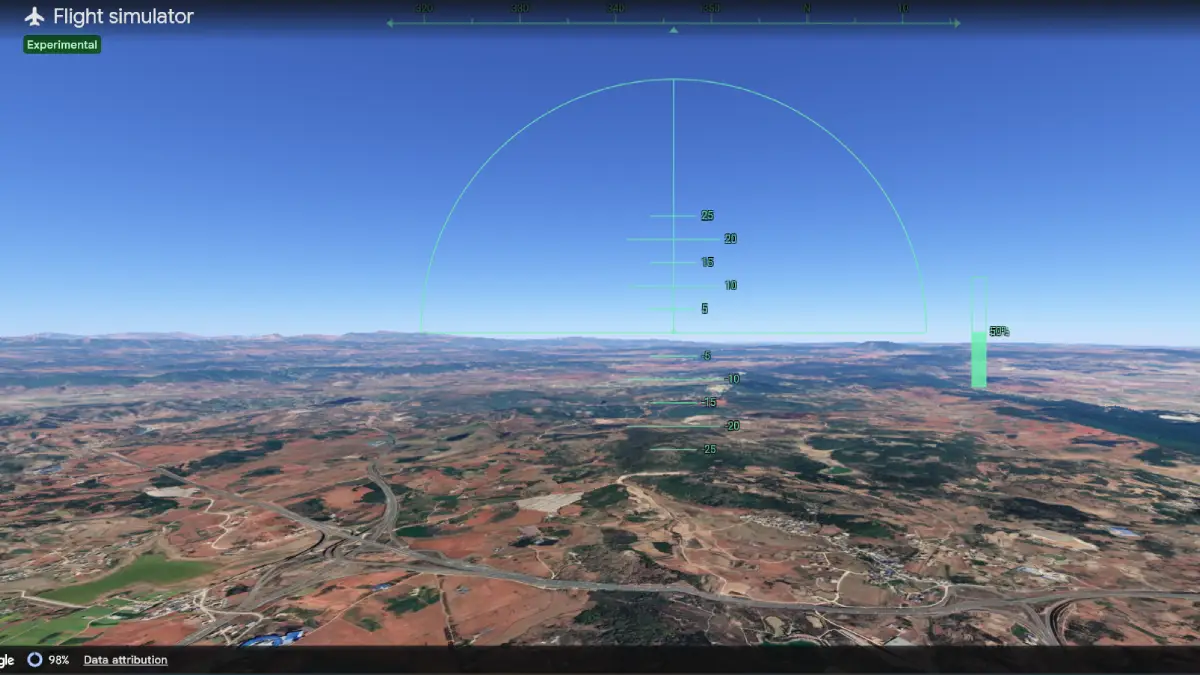
This feature used to be locked away in Google Earth Pro, the desktop version. Now anyone with a decent internet connection can hop into an F-16 cockpit and fly over the Himalayas, buzz the pyramids, or do a flyover of your neighborhood — all using real satellite imagery. It’s surprisingly fun, and it takes about 60 seconds to get started.
Getting Into the Cockpit in Less Than a Minute
Taking off is straightforward:
1. Go to earth.google.com/web in your browser
2. Click “Explore Earth” in the top-right corner and let the globe load completely
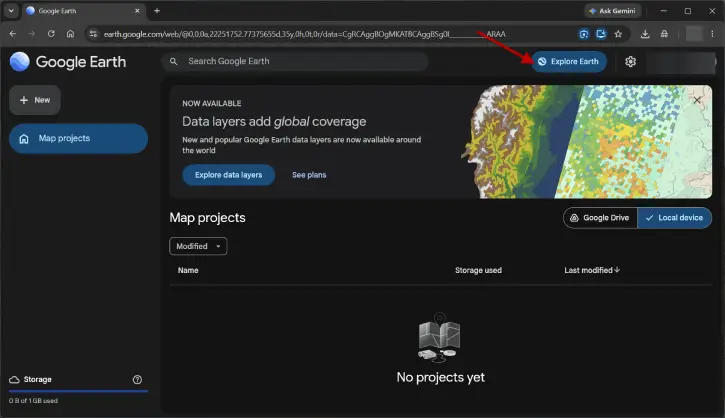
3. Find the “Tools” menu in the top navigation bar
4. Select “Flight Simulator” from the dropdown — it’s near the bottom
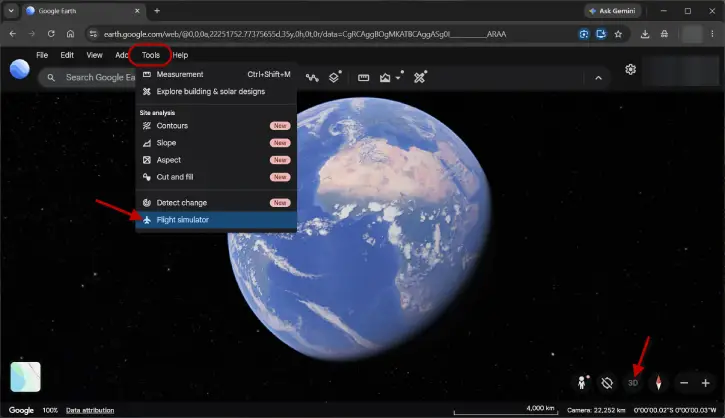
5. The simulator launches automatically and you’re in the F-16
Quick tip: Switch to Satellite view and 3D view mode before takeoff if it hasn’t done so automatically. The experience is night and day better when you’re flying over actual satellite imagery with 3D buildings below you. The simplified map view just doesn’t cut it.
Flight Controls: Keep It Simple
You won’t need a $300 joystick for this. The keyboard controls are basic and intuitive:
Action Control
Speed up Page Up
Slow down Page Down
Nose down Up Arrow
Climb / nose up Down Arrow
Bank left Left Arrow
Bank right Right Arrow
Toggle mouse steering Click in window
The mouse control is actually pretty clever. Once you click inside the window, your mouse becomes a joystick — it feels natural and responsive. Click again to disable it. And don’t worry about crashing (you will, probably multiple times). A friendly message appears with a “respawn” button that puts you back in the air at a safe altitude.
What Aircraft Are You Flying?
Right now, you’ve got one choice: the F-16 Fighting Falcon. It’s fast and responsive, but if you’ve used Google Earth Pro on desktop, you might remember the Cirrus SR22 — a smaller prop plane that was more beginner-friendly. Google may add it to the web version eventually, but for now, the F-16 is your only mount.
What This Simulator Actually Is (And Isn’t)
Be realistic about expectations. Google labels this as “experimental,” which means features and behavior could change. This isn’t Microsoft Flight Simulator or X-Plane. It’s not designed to teach real flying — it’s pure sightseeing fun. What you’re not getting:
- Realistic flight physics or stall behavior
Instrument panel navigation
Weather systems or wind effects
Multiple aircraft options (yet)
Multiplayer support
One real limitation: since the terrain and 3D buildings load live from the internet, flying at top speed over dense cities can cause some texture lag. A solid broadband connection helps avoid this frustration.
FAQ
Q: Do I need Google Earth Pro to access the flight simulator?
A: No. The flight simulator is completely free in the web version at earth.google.com/web. No subscription or download required.
Q: Can I fly the Cirrus SR22 like in Google Earth Pro?
A: Not yet. The web version currently only includes the F-16. Google may add it in future updates.
Q: What happens when I crash?
A: You get a “You have crashed!” message with a button to respawn instantly at a safe altitude. No penalty, no restart required.
Q: Do I need special hardware or a joystick?
A: Nope. Keyboard and mouse controls work great. A joystick would be nice but isn’t necessary.
Q: Will this work on my laptop with slow internet?
A: It’ll work, but you might experience texture loading delays, especially over cities or when flying fast. A solid broadband connection gives you the best experience.
Q: Can I fly multiplayer with friends?
A: Not currently. The simulator is single-player only.
The Bottom Line
Google Earth’s flight simulator is proof that you don’t need fancy hardware or expensive software to have fun exploring the world from above. It’s a genuinely entertaining feature buried in a tool most people use just to check out their neighborhoods. Spend five minutes flying over somewhere you’ve always wanted to visit — you might be surprised how satisfying it is. Just maybe don’t try a landing; that’s not really the point here.