

One of the much touted advantages of Firefox (and also Google chrome) is that you can easily enhance its functionality by downloading and installing what are known as extensions or add-ons.
Yes, it is true that Firefox has a very large repository of extensions. The newly introduced browser Google Chrome has also a growing add-on database and has some good extensions that Firefox misses.
If you wish to install a Google Chrome extension inside your Firefox, the add-on Google Chrome extension manager for Firefox will help you.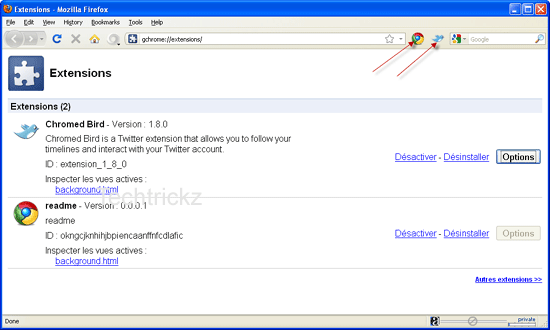
However, the installation is not an easy job and has no support for all extensions. You have to follow as described below after installing the extension (experimental) Google Chrome extension manager on Firefox.
- Download a Chrome extension using Google and extract the crx file.
- Go to your Firefox profile folder (C:Documents and Settings – {username} – Application Data – Mozilla – Firefox – Profiles – 86tc9fbi.default).
- Now go to the folder “extensions – [email protected] – extensions.
- Create a folder here, name it has the extension key preferably (something like “okngcjknhihjbpiencaanffnfcdlafic” for example).
- Copy & paste content of previously extracted package into this new folder.
- That’s it. Just restart Firefox now.
If you click on the “tools” menu, “Google Chrome addons” submenu, you’ll see extensions currently installed. (via)




Comments (15)
Problem… the actual firefox addon has been removed… :S
You can download a Chrome extension only using Google Chrome.
Arctura,
You must install the Firefox add-on Google Chrome Extension manager before doing.
You can see ‘Extension’ directory inside ’86tc9fbi.default’ directory.
I still dont get it how to download chrome extensions without install it.
i don’t understand this part
“Now go to the folder “extensions – [email protected] – extensions.”
i can’t find it on firefox’s directory nor the chrome’s
Lee,
thanks for reading and you are most welcom
That’s interesting to read. And I think most of the Chrome’s add-ons are available for Firefox also?
Very interesting information. Thanks a lot for it
Welcome Paul
Nice tutorial dude.
Yes it is quite interesting to read such an article. Really nice tutorial….
Nice tutorial. Thanks a lot for this.
Bringing the power of Chrome to Firefox! 😀 Cool post mate 😀
[…] This post was mentioned on Twitter by JK. JK said: How to install Google Chrome extension on Firefox?http://bit.ly/cG918E […]
Yea! Quite exciting news… Really informative. Thanks a lot man for sharing.
Comments are closed.