

 Vanishing files without your knowledge from your pen drive is common nowadays. Even if you enabled the option ‘Show Hidden Files’ in your Windows, still you can not see your file.
The main culprit behind this is malware infection to your drive. Don’t worry; you can safely recover your file very easily.
Sometimes you can solve it by connecting your pen drive into another computer that has an up-to-date good antivirus installed.
Or you can use the freeware USBShow software. Just download, unzip and run the program. Click on ‘Recovery the hide files’ button and select your USB drive. This should help you.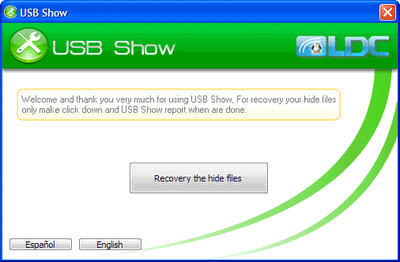
Remember; don’t forget to scan the recovered files with a good antivirus program. (via)




Comments (24)
Thanks yaar its too good very helpful for me
you saved me hours of work! thanks!
thank u!!! thamk u very very much!!!!!!!
Thanks bro……I have recover one tera byte data
Thankz bro…….
thanks …..it really works
tanks i am so happy my documents are full safed thanks very much
thanks sir really relly thanks …………………………………..you save my job
thank you so much. this software is very helpfull
Thank You so much for this software. It really worked. Now I all my important folders are unhidden 🙂
thanks for make this software and ur scale of thinking ……
thanks again
its really awesome.. thanks a lot………..
use cmd type
attrib -s -h *.* /s /d
Great post ………………Hartley thanks…..
hi, Hartley thanks, i have got my all data, it is really very helpful. thank you very much,
Hi, thank u yaar, its really good and useful and it works.
really wonderfull!!!
thanks a lot for the help
thank you so much. this software is very helpfull
Thank You So much for that software, its really usefull…Do u have any software like repairing corrupted Memory card
Thanks so much. It worke.
I cant belive it……
Realy it is a very good software thanks a lot….
Thank you so very much…it works!!!
Thankyou Sir. Really usefull this software. I recover with 10 seconds. Once again thankyou.
its all crap….
Comments are closed.