
Private browsing mode is a new feature you can find on all current web browsers. In this mode your browsing activity will not be stored on your computer.
But Opera (10.5) has a new private browsing feature that the other browsers currently missing. In Opera you can open a site in private browsing mode in a new tab while you are in normal browsing mode.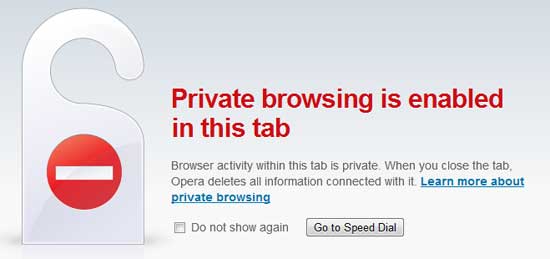
Here is how to enable Private Browsing Mode in Opera 10.50 and above. Opera supports private browsing mode both in tabs and windows.
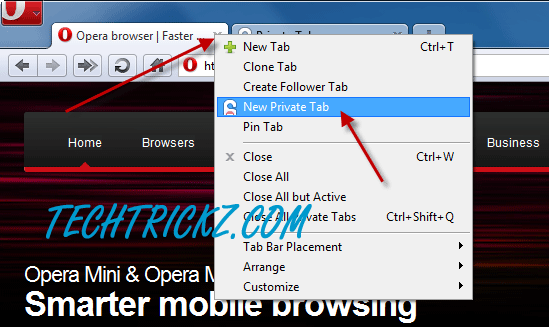
1. To open a private browsing in tabs: Right click on tab’s “+” icon and select New Private Tab. Private tab got a lock like icon at the right side of the tab icon.
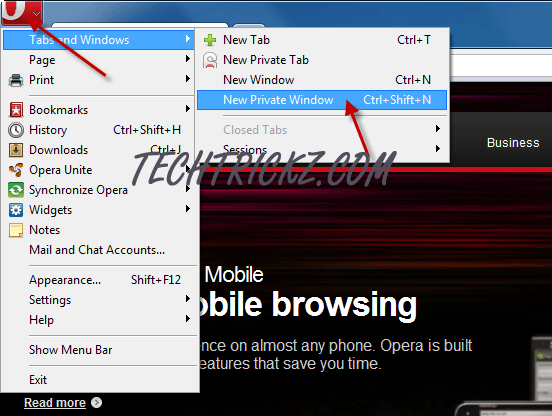
2. To open a private browsing window: Click on File menu, then select New Private Window. The private window is red colored. Any tab opened in the private window is a private tab.
Opera (10.5) is said to be the fastest browser on the earth and fully supports Windows 7 new feature Aero and Jump list. Interested users can download it from Opera website.
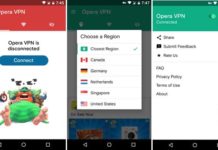

Internet security should be in the front of every ones mind. If you are travelling any where and using your laptop or mobile device then you need to use a VPN to protect your information and identity.
I sow Opera browser, do not store the data in private mod. But my asking is , if data on private mod of this browser are sotred into server/router?
u know that when u use this u only get a single tab in privite and not the window
Thank you very much! that’s exactly what I was looking for.
And seeing that Opera allows a private mode tab in a normal Opera windows – wow! that’s the best of all browsers.
Bye bye Chrome!
Simon, it is quite simple.
Just right click on the Opera shortcut icon on the desktop and select Properties.
Copy Opera shortcut path (C:\Program Files\Opera\opera.exe) from the Target field.
Right click on the desktop click New – Shortcut and paste previously copied path and leave a space and type –newprivatetab (C:\Program Files\Opera\opera.exe –newprivatetab), click Next and name it Opera private.
That’s it.
I’d like to know how I can permanently turn on private browsing. Like with Google Chrome you can put “- incognito” in the shortcut info on your desktop and it automatically starts in incognito (private browsing) mode.
[…] This post was mentioned on Twitter by Prajune. Prajune said: RT @jknext How to enable Private Browsing mode in Opera http://bit.ly/d7pplG […]