
Recently, I have switched to Windows 8. Most devices and apps I had on Windows7 works well in Windows8, but I am unable to connect my Micromax MMX353G USB dongle to Windows 8. I can install its modem software in Windows 8, but the device software will not detect the USB dongle and displays “No device” even though the USB dongle is plugged in. After a few research, I solved this issue. Here is how it is.
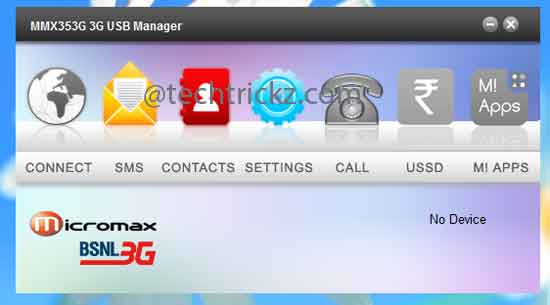
How to Connect Micromax MMX353G USB Modem in Windows 8
First, close the Micromax USB manger from desktop and exit the Micromax MMX353G USB dongle completely from system tray (right click and choose exit). Then, go to C – Program Files – MMX353G USB Manager – Driver.
Locate the file “InstallDriver.exe” and run it. After installing the driver, restart your computer and open “MMX 353G USB Manager” from desktop.
Open Device manager (just start typing device manger from Windows 8 start screen), and expand “Others”. Uninstall all “USB modems” listed that has a question (?) mark.
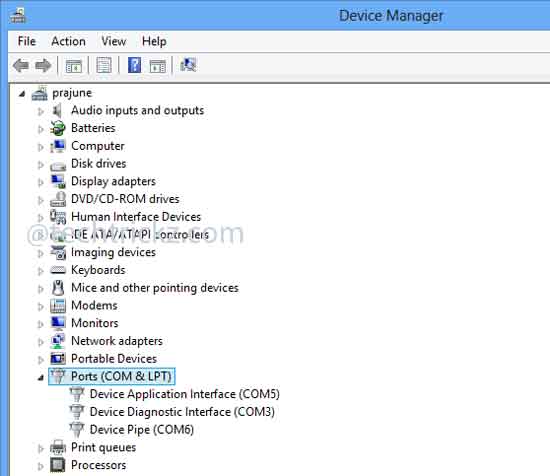
Now Search for hardware changes by right clicking device manger name.
After completing the hardware changes search, exit modem Software (MMX 353G USB Manager) as well as USB dongle from system tray.
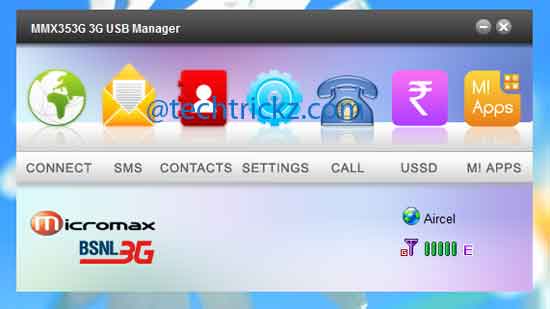
Start the MMX 353G USB Manager. The software will detect the modem and now you are ready to connect.
the same problem is going with me too…i was using my net and suddenly it happens..if u get any answer plz reply me too
I m using window 7 and usining
micromax 353G mordem for
conecting internet but from few
days when i am trying to conect
it show error.
Error msg is no ablable
connection profile add one.
I also reinstall my micromax
mordem softwear & click on seting option, then click on connection profile but no window or nothing can be open & same problem continued.
I use modem mmx354 xtra 3G USB . I had problem in connection net. It display no(u) sim card. How to solve the problem please reply
my dongle is getting slowed again n again and each time i disconnect n again reconnect it , it works fine for next 3 to 4 minutes and again the same problem
kindly help me out if u can
THANK YOU
everytime i insert my micromax modem i need to install it otherwise it says no device found.. how to fix this problem. please help me out.
Don’t warry MO. Device problem So simple to solve.
1. Unstall MMX353G
2. Unplug
3. Restart Pc
4. Install Modem_installation
5. Install showModem
6. PC restart
Enjoy Dost balle balle
mmx352g 3g connected in pc window xp but dial fail problem frequently pease solve the problem
just go to your C:\program files\mmx353g\drivers\win 8
And right click and install all inf files(e.g. cmntnet.inf, cmnumdm.inf)
And run modem application in win 8 compatiblity mode. then restart your pc.
sir ji
mera dongle laptop par installed nahi ho rha what prolems please replay
sir mai apne modam se call nahi kar paa raha hu
Thank you so much. It really worked.
I have faced a problem in datacard detection, first it is detected after sometime, undetected… Again detected and Undetected again Repeatedly… How can I fix this problem….
Hello ,
I’m using w8.1 64Bit , mmx353g
While installing it is showing failed & after opening error ” No Device ”
Can any one pls suggest me , what would went wrong
How to install micromax353 modem on windows 10 as it is showing no device i tried the same method to install it as it was installed on windows 8 pllllzzzzzzzzz can u suggest any method for this
I have micromax mmx353g modem but when i connect with my windows7 it shows no device please help me to conect
i brought a data card micromax353 modem.but sow NO(U) SIM CARD.plz help me to slove this problem
I m using window 7 and usining micromax 353G mordem for conecting internet but from few days when i am trying to conect it show error.
Error msg is no ablable connection profile add one.
I also reinstal my micromax mordem seting but not resolve proble.
Same error is geting plz help.
My mordem is working in other computer.but not in my.
i was unable to connect to internet when i am trying to dial failed please try again and even calling is also not done i am using windows8.1 64bit plz plz help me to slove this problem
plzzzzzzzzzzzzzzzz
Does your Funbook P280 supports mmx353g dongle?
Hello
I want to connect my micromax mmx353g dongle to micromax funbook p280
But everytime when i plug dongle to funbook it says “removed usb storage”
I dont know how to use it
Any extra software or driver is needed or not
Kindly help me ASAP….:-)
Plz plz plz……
Using winxp
Mmx 353 g micrmx showing no service
I have checks the above soln….but no result plz help
hey, i have tried every thing, but my modem is not working.
actually i can not find the file named “installdrivers.exe”.
what should i do???
plz help me……..
its really simple and easy to use
Hi,i want to connect my micromax 353g model to aakash ubslate 7ci tablet.i need ur help pls urgent
thanxxx it is very useful for me I solve my problem thank u
An easier way is to install the modem then go to networks and dial up the connection say BSNL. You will be connected. Or you can just buy a dongle that supports windows 8.
Usb dongle not installing on my desktop.when try to install computer hang.my desktop operating system is window xp sp2.please help how to solve the mm353 3g usb modem.
usmanjhi
I bought Micromax 353G data card. and I am trying to use Aircel 3G SIM to my laptop. when I open Micromax applicaiton – it shows ‘No Device’ my laptop having Windows 7. anybody please help me.
hey my win 8.1 pro,,mmx usb version 5.538 is nt wrking no device shwn..driver install fail..wat to do
i am using Windows7, in MMX353G folder.. inside driver folder,installDriver.exe file is not available… Now what to do??
Yes it worked, Thankyou. It isn’t showing no device now. But it could not connect to internet. It displays dial failed. I am using airtel prepaid sim. please give a solution soon.
Thanks.. Its working fine
The trick worked for me perfectly on my Win 8(32bit). Check your MMX353G USB dongle or try once again.
the trick is not working..
please help me by giving some another trick
I m running windows 8 pro 32bit
thanks it worked
thanks it work for me also thank thank very very much
Thanks bro, it really worked for me. I am using Windows 8 Pro 32-bit version. But I didn’t need to restart the PC, the device was detected automatically after installing the drivers. 🙂
i can not install drivers .dont know what the problem is??plz help
nice information ,this work for me (win 8 operating system)
it work for me but when i disconnect it doesn,t show no device instead show the
Thank you so much to help my problem… It is really work now.. 🙂
plz upload the link to the latest version of micromax usb manager. i havent found it anywhere else yet..
really THANK you……………I m furious bt wid the help of this info. i got everything……………DHANYVAAD
I have also tried by uninstalling all “USB modems” listed that has a question (?) mark but it get appeared again when i “Search for hardware changes” in windows 8. Any suggestions please?
thnxxxxxxx it worked…….it also works for mmx 310…..
[…] [via –techtrickz.com] […]
thanks…..its very useful and worked for me…thnks again!!
Download the latest driver software for your MMX35 3G (I think now it is version 5.7)and install it. Read the instructions given in the post twice before applying anything.
For further assistance, give details about your installation errors.
i couldn’t instal my mmx353G 3G dongle in windows 8.the above solution does not solve my problem……can u plz suggest me the another way to solve…..
Nice information. Actually I was looking for a solution. This worked for me. Thanks.