Skip to content
Samsung-GALAXY-Ace

Install Official Stock Firmware on Galaxy Ace S5830 (Ultimate Guide)

After trying out several custom ROMs on your good old Samsung Galaxy Ace S5830, you might want to go back to its original stock ROM for several reasons. For example, if the custom ROM drains your device’s battery more fastly, if your phone stuck at a bootloop after installing a custom ROM or any problem associated with custom ROMs. Here is an easy to do guide to install official stock firmware on Samsung Galaxy Ace S5830.

Read more
Galaxy-Ace-2

Root Samsung Galaxy Ace 2 on XXMC8 Firmware & Install ClockWorkMod Recovery 6.0.2.8

Recently Samsung has rolled out Android 4.1.2 Jelly Bean update for the Galaxy Ace 2 (GT-I8160) device. If you have updated your Galaxy Ace 2 to the official Jelly Bean (4.1.2) firmware (XXMC8), you might lose your phone’s root status, so you no longer able to flash apps, kernel or custom ROM (flashing means system files are replaced) come in the .zip format on your device.

Read more
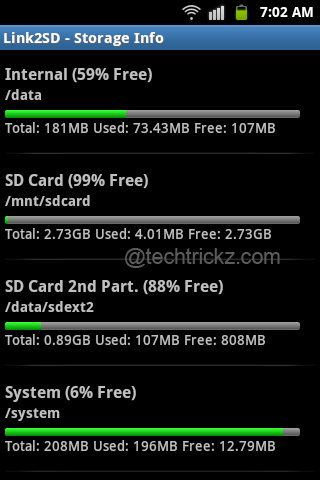
Link2SD-storage-info

Extend Internal Storage Memory of Android Phone by Utilizing a Portion of SD Card

Looking for a simple solution for extending the internal storage memory of your Android Phone? So that you can install as many app as you like (subject to the maximum size you decide). For example, the popular Samsung Galaxy Ace (S5830) has only 200MB internal storage memory, so after installing few apps it begin to show “low on space” warning. You can solve this “low on space” issue by utilizing a portion of your SD card for installing apps.

Read more
Back To Top