

Avast antivirus free edition is my favorite security software for Windows 7. Because it offers good security features than other free antivirus programs.
But, one thing annoying me is that the free version of Avast antivirus (v.5.0) displays advertisement (when connecting the system to internet) about their pro version on the main window (see screenshot below shows with ad).
Like me, if you think it is annoying, here is how to prevent displaying ads in Windows 7. Just follow as described below.
In windows 7, open Control Panel and select Windows Firewall. Then select Windows Firewall Advanced settings.
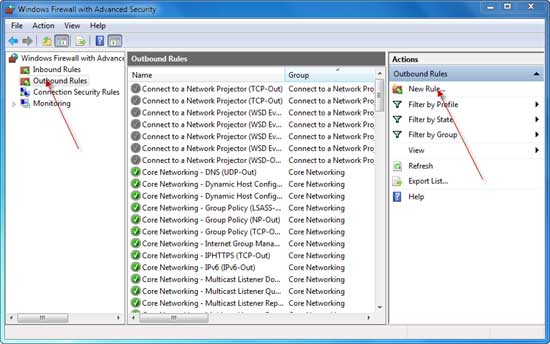
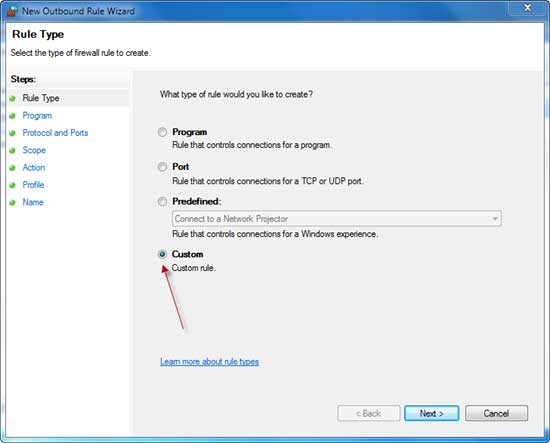
Now click Outbound rules (on the left pane) and choose New rule (on the right pane).Then select Custom at the bottom and click next button (see screen shot).
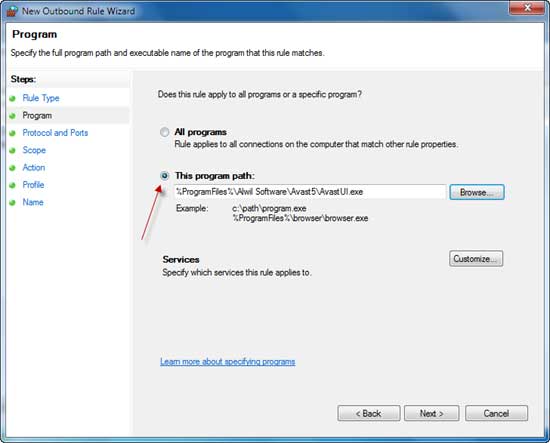
Now select “This Program Path” and browse to Avast install directory and choose AvastUI.exe and click next button.
Now click next (Protocol and Ports window), click next (scope window). Now you got Action window. Here make sure that bottom rule is selected to block and click next.
In this window (profile) make sure that all profiles are selected: domain, private, and public and click next. Now just enter any name and description for your rule.
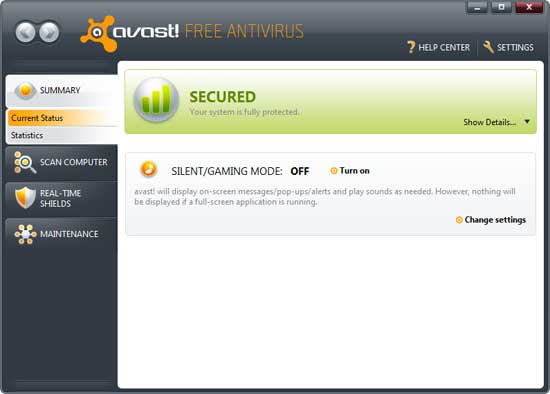
Now finish your settings and restart your Windows 7. Screenshot shown below shows without ad.
Related topics: How to block pop-up notifier of Free Avira Antivirus?



Comments (12)
This works well, but does it also work to block the pop up ads that occur occasionally?
I actually am using PC Tools Plus Fire Wall 7 on a dual boot XP Home and Win7 Ultimate system.. In both cases I followed the info above to cease application in/out connections to the file.. It did and still is working like a charm on both op systems..
GR8 useful and helpful info there., THANKS.!
Using free Avast version 6.0.1125 with File/Email/IM/Network/Behavior shields active – Windows Defender – PC tools FW Plus 7 as my barriers..
Thanks for the share.
If you use Zonealarm or another firewall, just prevent AvastUI.exe from going to the internet. Also, clear out the IE cache.
Works 1 or 2 days on windows 7 64 bit and I need to make agaim, agaim…..
Jason Saggers,
Thanks for reading and most welcome to my blog.
I tried this on my Vista desktop and it also works perfectly, I will have to try this for a few other programs also.
Great tip.
Cool trick mate! Glad to know more tricks from m favorite free anti virus 😀
This will also save some bandwidth, i use it my firewall to block some ads on the webpages.
hmmmm! I was thinking a way to get ride of this ad. Thanks for this tutorial,
I not often visit the main interface, that’s why I never care about it; may be someone. Thanks for sharing this tutorial.
This is a great information. My friend use it. I will tell him.
Comments are closed.