

You might have already learned that the Metro version of Internet Explorer 10 on Windows 8 as well as on Windows RT won’t play flash content properly on all websites. This is because Metro IE10 supports flash only on sites that Microsoft has whitelisted, other sites won’t play flash contents. Since lot of sites aren’t whitelisted yet, you can’t play flash content properly each and every site. However, you can add any site in the whitelist. Here is how it is.

Enable flash in IE10 Metro on Windows 8 and Windows RT
– From classic desktop, run Internet Explorer 10 and press Alt button on keyboard. From the “Tools” menu, select “Compatibility View Settings” and uncheck the option “Download updated compatibility list from Microsoft”.
[If this checkbox is checked, IE will override your custom whitelist back to default on each reboot]– Then, go to “C:\Users\Username\AppData\Local\Microsoft\Internet Explorer\IECompatData”. There you will see “iecompatdata” xml file.
[Don’t forget to enable “show hidden files” from the explorer ribbon menu]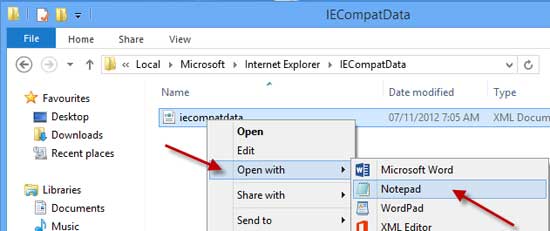
– Right-click on “iecompatdata.xml” file and open it in Notepad. It’ll show all flash enabled websites by Microsoft in IE10 Metro.
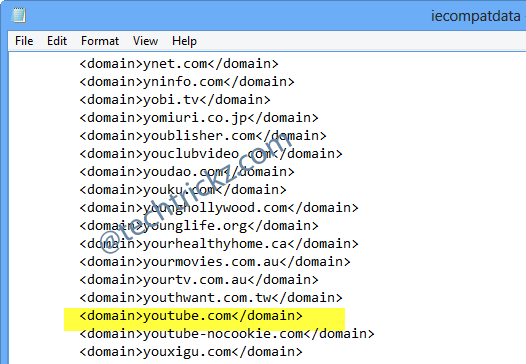
-Now you can easily add your favorite sites to this compatibility list one by one. For example,For example,‹domain›site URL to enable flash‹/domain›.
Final words: The main benefit of this trick is for Windows RT users, because Windows RT won’t allow third party browsers to install. [Via]



Comments (2)
That was a great information you had shared. Why Microsoft won’t allow other browsers on Windows RT as other OSs supports?
Having read this I believed it was extremely
informative. I appreciate you taking the time and effort to put this
content together. I once again find myself spending way too much time both reading and commenting.
But so what, it was still worth it!
Comments are closed.