Get Free License for Files Inspector Pro: Manage Disk Space on Your PC
Files Inspector is a user-friendly tool for Windows that helps you analyze and free up disk space quickly. It displays how storage is used in easy-to-understand visual graphics, making it simple to find large files, messy folders, and duplicate apps.
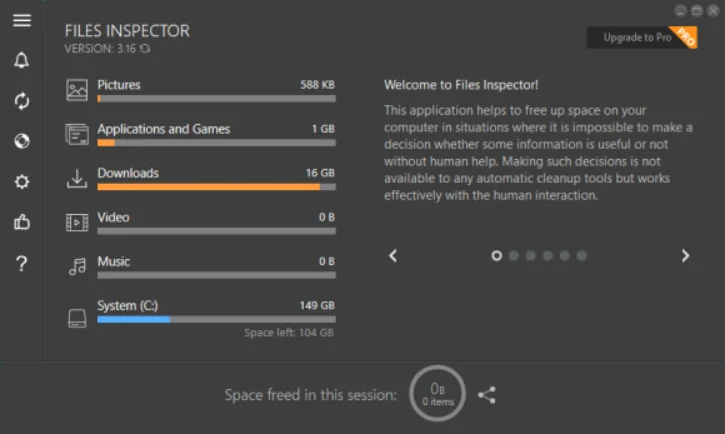
Files Inspector shows various types of files, including folders, documents, images, videos, and music. It clearly displays the space each type occupies on your disks, making it easy to understand where your storage is being used.
For advanced users, Files Inspector features a powerful parser. This allows for a detailed assessment of all files and folders on your existing storage media. You can easily evaluate your data and identify what takes up the most space.
After identifying unnecessary files or folders, you can delete them directly within Files Inspector. There’s no need to use Windows Explorer or other file management tools, making the process quick and convenient to free up storage space.
Additionally, this system utility lets you remove unwanted applications easily. You can delete apps directly through the tool, simplifying the process. To avoid mistakes, all deleted items are sent to the Recycle Bin for easy restoration if needed.
Table of Contents
Features of Files Inspector
- Quick Disk Space Analysis: Evaluate disk space usage right after system startup.
- Visual Data Representation: Utilize intuitive diagrams to illustrate data.
- User File Analysis: Quickly assess user files, including documents, videos, music, and others.
- Advanced Storage Parsing: Conduct in-depth data analysis of storage media.
- Effortless File Deletion: Remove unnecessary files and folders directly within the application.
- Application Removal Tool: Integrated feature to eliminate applications for additional space recovery.
- Safe Deletion Mechanism: Deleted items are redirected to the Recycle Bin for easy recovery.
- Lossless JPEG Compression: Save space with high-quality JPEG image compression.
- Multi-Drive Storage Assessment: Analyze and evaluate storage across various drives.
Files Inspector Pro is offering a limited-time promotion for a lifetime license. This guide will show you how to obtain it for free.
Get Free License for Files Inspector Pro
1. Go to the developer’s webpage and download the Files Inspector application (link).
2. Install the application on your computer and open it.
3. In the main window, click on “Upgrade to PRO” in the top right corner.
4. Enter the code provided and click “OK.”
+License code
License (Nov 21, 2025): ZJD4NT-W60A6E-L81NK7-I7M35S-R3WL05-WJYTI4-HBC9NK-V3ZOZ3-X9C9
Note: Files Inspector Pro supports Windows 11, 10, 8 and 7 (32-bit and 64-bit). This is a lifetime license for version 4.41 and will expire soon.
Conclusion
Files Inspector Pro is a useful tool for managing disk space. It quickly analyzes disk usage, shows storage visually, and has deletion tools. However, it may have performance issues and limited language options, making it suitable for some users.

Related Posts