Download Microsoft Office 2007 All Editions for Free
Microsoft ended support for Office 2007 on October 10, 2027, meaning it will no longer receive updates for features, security, or privacy. Despite this, many users continue to utilize this office suite because it is lightweight and delivers fast performance even on low-end PCs.
Even though the development of Microsoft Office 2007 has reached its end, this won’t prevent you from downloading and installing the app. Microsoft Office 2007 ISO files (32-bit/64-bit) are still available on the web and work with both Windows 11 and 10.
Table of Contents
Download Microsoft Office 2007 for Free (32-bit/64-bit-Direct link)
Microsoft Office stands out as the best office suite available today, despite the variety of options out there. When compared to free alternatives, Microsoft Office offers superior features, enhanced controls, and a more user-friendly experience.
If you are interested, you can download Microsoft Office 2007 for free from the link (archive.org) given here. Once you have the installable file, simply follow the on-screen instructions to complete the installation of MS Office 2007.
- Download Microsoft Office 2007 SP3 (All Editions)
- Download Microsoft Office Professional Plus
- Download Microsoft Office 2007 Enterprise Edition
ALSO READ: Download Windows 11 25H2 Tiny11 ISO Files (x64 & ARM64)
How to Install Microsoft Office 2007 on Windows?
Microsoft Office 2007 is compatible with Windows XP, 7, 8, 10, and 11. While it functions on all these Windows versions, there may be some issues when using it on Windows 11.
1. Download MS Office 2007 from the provided link.
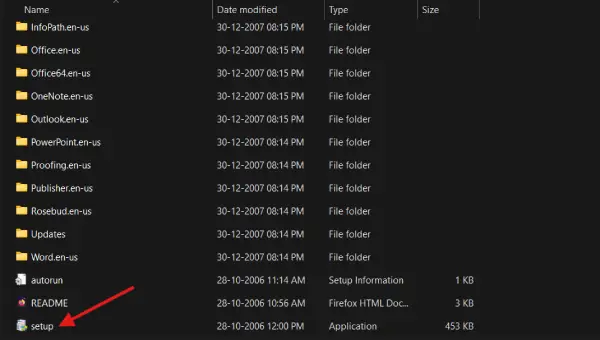
2. Open the folder where the download is located and double-click the setup.exe file.
3. When prompted, enter the Product Key (see below paragraphs) and click Continue.
4. On the next screen, click the Install Now button. If you prefer to customize the installation, select Customize.
5. Wait for the MS Office 2007 installation to complete, then close the installation window.
You have successfully installed Microsoft Office 2007 on your computer. You can now access and use applications such as Word, Excel, PowerPoint, and other Office programs to enhance your productivity and complete various tasks.
How to Get Microsoft Office 2007 Product Key for Free
To activate Microsoft Office 2007, you need genuine Product key. You can get product keys from third-party sites like Scribd. However, be aware that these product keys may become inactive over time due to misuse.
If the product keys are not working, you can use third-party activators, such as KMSPico, to activate MS Office 2007. Alternatively, you might ask a friend who has a legitimate copy of MS Office 2007 for their product key.
ALSO READ: Download Windows XP 32-Bit/64-Bit ISO Files (Direct Links)
Final Thought
MS Office 2007 reaches its end of support. It means you will stop receiving updates and security fixes. Using software that isn’t actively developed can be risky for your computer and may expose you to security threats.
You won’t get any new updates, security patches, or support from Microsoft. However, many users continue to use Microsoft Office 2007 without facing significant security or privacy issues.

Related Posts