Moto X’s Trusted Bluetooth Devices feature that is also coming in the upcoming Android L automatically unlocks your lockscreen when your phone comes with in the range of a trusted Bluetooth device. It can be very useful when you use your Moto X with Bluetooth smart devices such as Smartwatch, Headsets, Car audio or Fitbit.
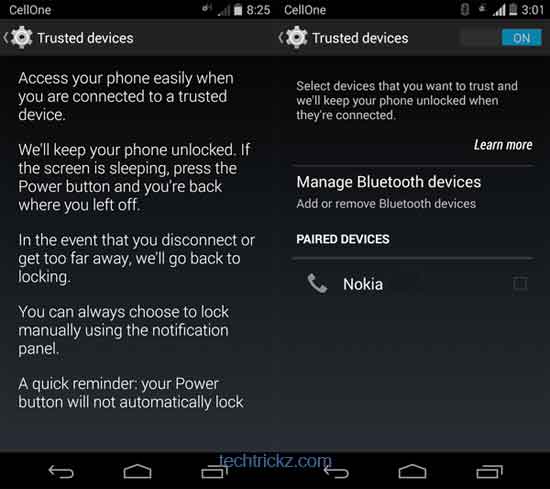
Moto X is really a great phone. What makes it so good is that, though it is a near-stock Android build, the additional feature such as Trusted Bluetooth Devices, Active Display, Touchless Control, Assist, etc. adds to the core experience.
If you do not have a Moto X or the new Android L, you can still get “Trusted Bluetooth Devices” functionality on your device with the Tasker app. A recent update to the app added a new “state” called Bluetooth Near (BT Near), which activates when a specific device is nearby. You can use this feature with the “Secure Settings” Tasker plug-in to enable or disable the lock as required.
The advantage of this function is that when your phone comes with in the range of a trusted Bluetooth device, the lockscreen is automatically bypassed – no need to enter PIN, Pattern or Password to open your phone.
And, when a trusted Bluetooth device moves out of range or switched off, the lockscreen comes back including PIN, pattern, password or whatever.