
Download Oppo K15 Pro & K15 Pro+ Stock Wallpapers [FHD+ Resolution]
Oppo has launched two new gaming smartphones—the K15 Pro and K15 Pro+—both emphasizing gaming performance, advanced cooling, and customizable hardware. The Oppo K15 Pro series phones include 9 exclusive wallpapers across 4 color themes that match its cyberpunk design. You can download these wallpapers to use on any of your phones using the link below.
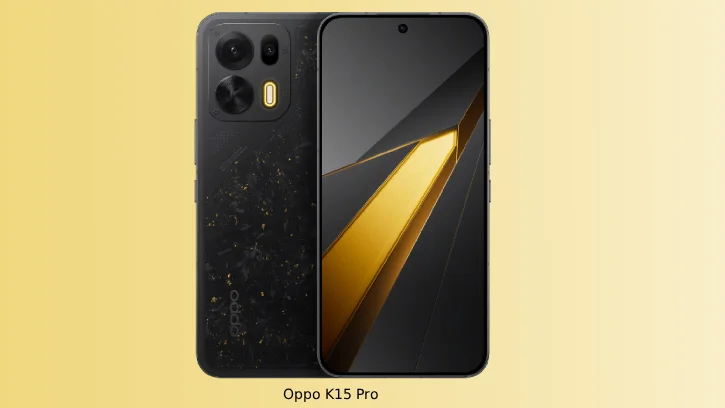
The Oppo K15 Pro features a striking cyberpunk design with four exclusive colors: Cyber Wings, Light Dust Pink, Origin Gray, and Golden Legend—an industry-first factory-forged carbon finish. Oppo provides matching wallpapers to enhance the futuristic aesthetic, allowing you to fully embrace the device’s cutting-edge visual identity and seamlessly integrate its design philosophy throughout your user experience.
Regarding the internal specifications, the Oppo K15 Pro delivers flagship performance with a 6.78-inch 1.5K OLED display boasting 165Hz refresh rate and 1800 nits peak brightness. Powered by the Dimensity 9500s processor and 12GB RAM, it excels in gaming and multitasking. The dual rear camera system features a 50MP main sensor with OIS and an 8MP ultra-wide lens, supporting 4K 60fps video. An 8000mAh battery with 100W fast charging ensures all-day usage, while the in-display 3D ultrasonic fingerprint sensor provides secure biometric authentication.
The Oppo K15 Pro and Pro+ feature beautiful wallpapers available in FHD+ resolution (1256 × 2760 pixels) for downloading. The wallpapers are crafted to match the phone’s distinctive color themes—Light Dust Pink, Origin Gray, Cyber Wings, and Golden Legend—while the K15 Pro series also includes exclusive ColorOS 16 wallpapers. All backgrounds are optimized for the original resolution to ensure premium aesthetics on your device.
Table of Contents
Download Oppo K15 Pro Stock Wallpapers
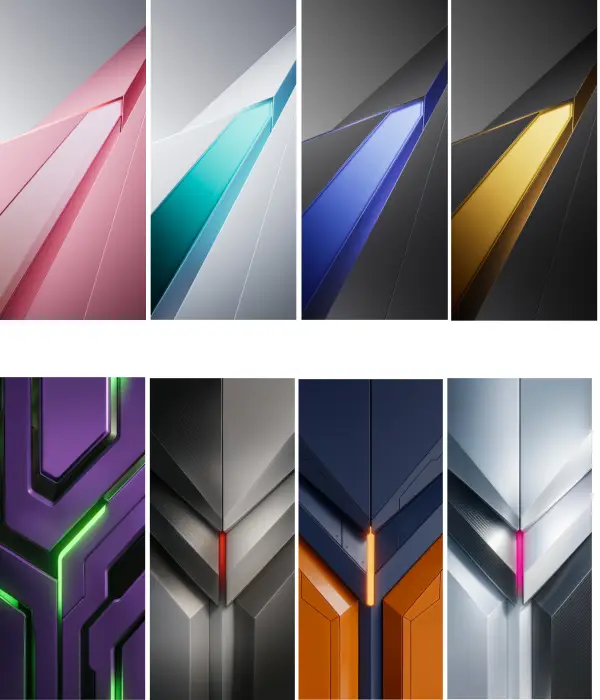
Interested users can download the 9 exclusive gaming wallpapers to use on their phone from the link given below.
Download Oppo K15 Pro Wallpapers (Google Drive)
How to Set Your Wallpaper
After downloading the wallpaper, follow these simple steps:
- Open your Downloads folder and unzip the wallpaper file
- Locate the wallpaper image you want to use
- Open the image on your device
- Tap the three-dots menu icon that appears on the screen
- Choose “Set as Wallpaper” from the menu options
- Confirm your choice for either your home screen or lock screen
That’s all you need to do! Your new gaming wallpaper will now be displayed on your device.
Conclusion
Whether you own the Oppo K15 Pro, K15 Pro+, or any Android device, these 9 exclusive gaming wallpapers are a simple way to elevate your phone’s aesthetic. With stunning cyberpunk designs available in crisp 1256 × 2760-pixel resolution, you can seamlessly match your device’s visual identity and embrace the futuristic philosophy of Oppo’s latest flagship.

Related Posts

Comments (0)