Download Samsung Galaxy S26 Ultra Wallpapers (Leaked)
Samsung is preparing to launch the next-generation Galaxy S-series flagships early next year. Leaked renders and wallpapers for the Galaxy S26 Ultra reveal design details of the device. Below are the leaked specifications and links to download the Galaxy S26 Ultra wallpapers.
The Samsung Galaxy S26 Ultra, successor to the S25 Ultra, is expected early next year. Twitter user @wr3cckl3ss exclusively shared six high-quality wallpapers in Orange, Brown, Black, Purple, Sky, and Silver/White, suggesting those may be the phone’s color options.
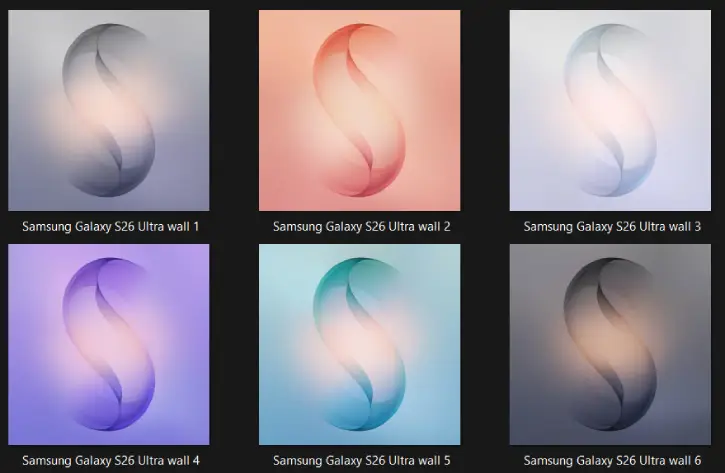
Table of Contents
Leaked Specifications of Samsung Galaxy S26 Ultra
Leaks say the Samsung Galaxy S26 Ultra isn’t official yet, but it will have a thin design, run Android 16 with One UI 8, and get up to seven big Android updates. It’ll be rated IP68, so it’s dust-tight and water-resistant.
The phone is expected to have a 6.9-inch Dynamic LTPO AMOLED 2X screen with a 120Hz refresh rate and Corning Gorilla Armor 2 glass. It should use a Snapdragon 8 Elite Gen 5 (SM8850-AC) chip with an Adreno 840 GPU, come with 12GB or 16GB of RAM, and offer 256GB, 512GB, or 1TB of storage.
The phone’s cameras include a 200 MP wide main sensor, a 10 MP telephoto, a 50 MP periscope telephoto, a 50 MP ultrawide on the rear, and a 12 MP wide front-facing selfie camera.
Download Galaxy S26 Ultra Wallpapers (Leaked)
Like previous models, the Galaxy S26 Ultra wallpapers have a simple “S” design to show it’s a flagship. There are six high-quality wallpapers—in orange, brown, black, purple, sky, and silver/white—and all can be downloaded at 2048 × 2048 pixels, so the image quality is high.
Download Galaxy S26 Ultra Wallpapers (Gdrive)
After downloading, go to your Downloads folder and pick the wallpaper you like. Open the image, tap the three-dot menu, then choose the option to set it as your home screen or lock screen wallpaper.
For more wallpapers from other devices, check out our Wallpaper Download section.

Related Posts