
Safe Mode is a troubleshooting mode for Windows that starts your PC in a limited state. This is useful when you are not able to troubleshoot your PC properly in the normal mode.
However, if you want to uninstall a problem causing program in Safe Mode, normally you can’t without a registry tweak.
This is because, in safe mode Windows starts in a limited state, so the required Windows Installer service isn’t started so most programs can’t be uninstalled.
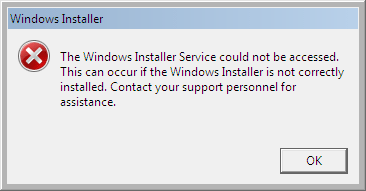
SafeMSI.exe is a tiny potable tool designed to uninstall programs very easily in safe mode. This utility will do a registry tweak and launch the Windows Installer service with a click.
If you want to uninstall a program in safe mode (You can enter into Safe Mode by pressing F8 key when the computer boots up), just run the tool SafeMSI.exe in Safe Mode, you don’t need to edit the risky registry by hand.

SafeMSI.exe is compatible with Windows 2000, XP, Vista and 7 and can be downloaded it free at source. [Via]




Thank you very much for the positive comments. If there are any improvements needed to the tool, feel free to let me know at:
harry@[NOSPAM]rocksystems.net
It was coded originally back in 2004, so it may need updating for Windows 7. From what I heard, it does work fine.
You can find my other tools at WindowsITPro.com by searching “Harry Bates”.
Arafat,Yes it is useful for installing/uninstalling in Windows Safe Mode
Hi Matin,
Welcome and thanks for reading!
SafeMSI.exe is good 🙂
A must have tool for software tester, thanks for sharing this.