
There are tones of utilities, technologies and tools available for your smart phone to make your ‘mobile’ experience more eventful.
However, too many installed applications can cause trouble to you and put them in order is also burdensome job.
Advertisement
To help you, here is a free application for Android phone called Apps organizer that allow you to organize installed applications effortlessly using labels. 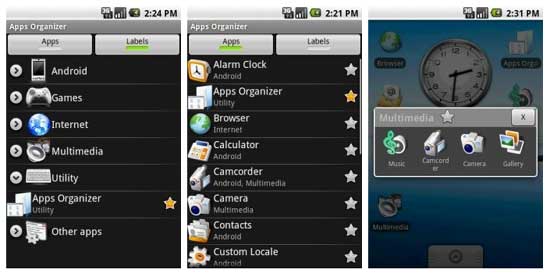
With apps organizer you can:
- Associate one or more labels to each android application
- Create a “label shortcut” or a widget (with a custom icon) on Android home that contains shortcuts to applications with a label
- Uninstall an application
Interested Android users can download Apps Organizer free at developer’s page.
Advertisement




Sathish, welcome once again!
Laurance, thanks for the comment!
Nice share mate. Really useful application for android.
Its very simple, than I expected. Thanks for sharing mate.